Fall Seamless Patterns, Digital Papers
There’s a quiet shift in the air this time of year—crisp mornings, golden light, and the unmistakable warmth of autumn palettes. If you’re designing invitations, updating your planner, crafting seasonal blog graphics, or developing small-batch stationery, Fall Seamless Patterns, Digital Papers offer more than just visual appeal: they deliver professional-grade versatility, grounded in authenticity and craftsmanship.
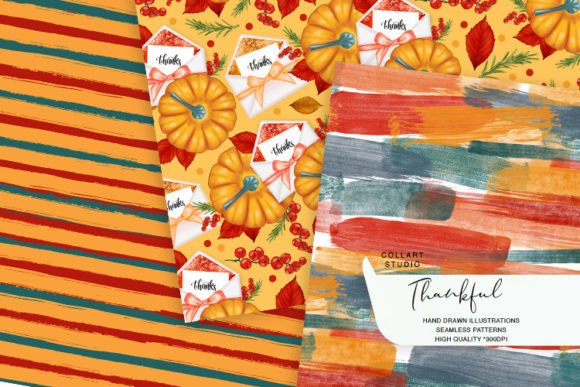
These aren’t mass-generated AI patterns or recycled stock assets. Each design is hand drawn and painted by Collart Studio—original artwork translated into high-resolution digital papers (300 dpi, 12×12 inches) that tile seamlessly across any surface. You’ll receive three distinct, cohesive patterns—thoughtfully composed with organic texture, subtle layering, and seasonal nuance—designed to work as backgrounds, overlays, cut-out elements, or repeating motifs for physical and digital projects alike.
Why seamless matters—and why “seamless” doesn’t always mean what you think
Many creators assume “seamless” simply means “repeats without obvious breaks.” But true seamlessness goes deeper: it requires balanced scale, consistent line weight, intentional negative space, and harmonious color transitions—all tested across real-world applications. Poorly constructed seamless patterns often reveal misaligned edges, jarring contrast shifts, or pixelated joins when scaled or tiled in design software. That’s especially noticeable on printed planner stickers or fabric mockups.
For example, one customer used a low-contrast fall pattern for a wedding invitation suite—only to discover the subtle leaf motif disappeared entirely when printed on kraft paper. Another tried stretching a non-tiled version across a large poster and ended up with visible seams and distorted proportions. These aren’t flaws in skill—they’re avoidable issues rooted in how the pattern was built and delivered.
What to check before downloading or buying
Before adding Fall Seamless Patterns, Digital Papers to your cart—or any digital paper collection—verify these four practical details:
- Resolution and dimensions: Confirm files are truly 300 dpi at 12×12 inches (not upscaled from smaller originals). Lower resolution may look fine on screen but won’t hold up in print, especially for detailed planner stickers or fabric printing.
- True tiling capability: Open one file in Photoshop or Affinity Designer, duplicate the layer, and offset by exactly half the canvas width/height. Look for hard lines, mismatched textures, or abrupt color shifts at the edges. Collart Studio’s patterns are tested this way—no guesswork required.
- File format compatibility: These are delivered as high-quality PNGs with transparent backgrounds—ideal for layered designs in Canva, Procreate, Silhouette Studio, or Cricut Design Space. Avoid JPEG-only bundles if you need transparency for cutouts or overlays.
- Usage rights clarity: Some sellers restrict commercial use or limit quantities per project. With Collart Studio’s Fall Seamless Patterns, Digital Papers, you’re free to use them across personal and commercial projects—including client work, small-batch products, and digital templates—as long as you don’t resell the files themselves.
Avoiding the “pretty preview” trap
It’s easy to fall for beautiful thumbnails—especially when browsing marketplaces flooded with seasonal content. But a striking preview image doesn’t guarantee usability. One common oversight? Ignoring how the pattern behaves at different scales. A tightly packed acorn-and-ivy motif might look lush at full size but become muddy and indistinct when reduced to a 1-inch planner sticker. Conversely, an overly sparse design can feel empty on a large invitation background.
The better approach: download a sample (if offered), import it into your usual workflow, and test it at multiple sizes—1 inch, 4 inches, and full 12×12 inches. Try placing text over it. Try applying a soft drop shadow or blending mode. Does the pattern support legibility? Does it enhance rather than compete with your message? Collart Studio’s patterns are intentionally designed with mid-density repetition and clear focal points so they adapt—not overwhelm.
Realistic uses—and where people underestimate their value
Yes, these papers shine in obvious places: custom greeting cards, printable wall art, and themed digital planners. But their strength lies in less obvious applications too.
Consider educators creating printable fall-themed worksheets—the subtle texture adds tactile warmth without distracting from learning objectives. Or bloggers building Pinterest-optimized blog headers: a seamless pattern layered beneath bold typography creates depth and seasonal relevance without needing custom illustration. Freelancers designing email newsletter banners find them faster and more distinctive than generic stock backgrounds. Even small business owners using them for limited-run product packaging report stronger perceived quality—because handmade texture signals care, not automation.
What’s often overlooked is how much time these papers save in iteration. Instead of building complex repeat swatches from scratch in Illustrator—or hunting across five sites for compatible elements—you get three ready-to-use, cohesive options that share a unified color story and artistic voice.
Getting the most out of your download
Once you’ve downloaded your Fall Seamless Patterns, Digital Papers, start simple. Import one into your design tool and try these three low-effort, high-impact experiments:
- Use it as a clipping mask for seasonal quotes—type your text, place the pattern above it, right-click > “Create Clipping Mask” (in Illustrator) or use “Mask” in Procreate. Instant texture, zero alignment hassle.
- Scale it down to 25% and overlay it softly (set layer opacity to 10–20%) behind solid-color elements. This adds quiet dimension—ideal for clean, modern invitations or minimalist planner tabs.
- Import into Cricut Design Space or Silhouette Studio, then use the “Print & Cut” feature to create custom die-cut tags or gift toppers. The hand-painted texture gives physical pieces character no vector-only design can replicate.
And remember: click “Zoom” on each product image before purchasing. That’s where you’ll spot brushstroke integrity, edge consistency, and tonal balance—details impossible to judge in thumbnail view.
Ultimately, Fall Seamless Patterns, Digital Papers aren’t just about aesthetics. They’re a thoughtful shortcut—bridging the gap between handmade authenticity and digital efficiency. Whether you’re sketching your first planner layout or launching a seasonal product line, choosing patterns built with intention (and tested for real use) means spending less time troubleshooting and more time creating work that feels both personal and polished.