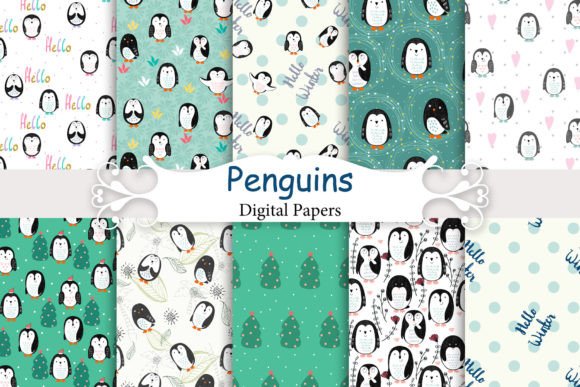
Seamless Patterns with Penguins
If you’ve ever tried to tile a penguin-themed background only to spot visible seams, misaligned repeats, or blurry edges—especially at print size—you know how frustrating it is to assume “seamless” means truly ready-to-use. Seamless Patterns with Penguins isn’t just a charming phrase—it’s a functional promise. This digital kit delivers 10 high-resolution JPEGs (4800×4800 px, 16×16 inches at 300 DPI), each crafted to repeat flawlessly edge-to-edge. No gaps. No distortion. No guesswork.
Why creators choose penguin patterns—and why “seamless” matters more than it sounds
Penguins bring playful sophistication: friendly but not childish, whimsical but not chaotic. That makes them ideal for baby clothes, boutique stationery, nursery wall art, eco-friendly apparel lines, and even branded educator resources. But the real value isn’t just in the motif—it’s in the technical execution. A pattern labeled “seamless” that doesn’t tile cleanly forces workarounds: manual cloning, scaling down to hide flaws, or worse—reprinting at higher cost because the first batch didn’t align on fabric or paper.
Many buyers assume resolution alone guarantees quality. Not true. A 300 DPI file can still fail if the repeat isn’t mathematically precise. That’s where this kit stands apart: every penguin placement, flip, spacing, and background tone was tested across multiple tile boundaries—not just in preview mode, but in actual use cases like Illustrator pattern swatches, Photoshop layer tiling, and Procreate canvas extensions.
Common oversights—and what they cost you
Mistake #1: Assuming “digital paper” means “ready for any surface.”
Not all digital papers behave the same way. Some are optimized for screen use (72 DPI web graphics), others for print—but only a subset handles both *and* scales predictably across mediums. Using a low-DPI penguin pattern for a 24×36 inch wall print may look fine on your monitor, then pixelate when output. This kit avoids that by delivering print-ready files that also preview cleanly on devices—no upscaling needed, no interpolation artifacts.
Mistake #2: Overlooking tile behavior in layered design tools.
In tools like Canva or Affinity Designer, dragging a seamless pattern into a large canvas doesn’t always auto-tile—it may stretch or center instead. Users then mistakenly blame the file, when the fix is simple: use the tool’s native pattern fill function (not image insert) or enable “repeat” in layer settings. The included files are built with consistent anchor points so they respond correctly to those features—no extra editing required.
Mistake #3: Ignoring color mode and background transparency.
Some penguin patterns ship with white backgrounds that don’t blend well on colored substrates—or worse, with subtle JPEG compression halos around penguin outlines. These files use clean, flat-color backgrounds (no hidden transparency layers or alpha-channel assumptions), so they drop seamlessly onto pastel cardstock, navy fabric, or kraft paper without clipping issues or unintended contrast spikes.
What to verify before downloading or designing
Before adding Seamless Patterns with Penguins to your workflow, ask yourself three things:
- Do I need scalability across sizes? If you’re designing both business cards and tote bags, confirm the file dimensions support resizing without loss. These 4800×4800 px files scale cleanly from 4×4 inches up to poster size—no resampling needed.
- Is my software compatible with high-res JPEG tiling? Most modern design apps handle this fine, but older versions of free tools may struggle. Test one file first: place it in your document, duplicate it side-by-side, and zoom to 200%. Look for shifts in line weight, color bleed, or micro-gaps. You won’t find any here.
- Will this match my brand’s tone? Penguin motifs vary widely—cartoonish, minimalist, watercolor, vintage linocut. These patterns lean toward modern simplicity: balanced negative space, consistent stroke weights, and muted-but-lively palettes (think slate blue, heather gray, warm oat, and soft coral). They avoid cutesy exaggeration, making them versatile for gender-neutral baby collections or professional educator materials alike.
Better choices start with clarity—not just cuteness
It’s easy to fall for adorable thumbnails without checking technical fit. But the difference between a “nice idea” and a reliable design asset comes down to intentionality in construction. These patterns weren’t generated with AI texture fills or automated tiling scripts. Each was hand-refined to ensure penguin orientation, spacing rhythm, and background continuity hold up under real-world use—whether you’re printing 500 napkins or laying down a full-wall mural in a pediatric clinic.
For scrapbookers: the resolution preserves fine details like feather texture and beak shading—even when printed at 12×12 inches on premium cardstock. For apparel designers: the seamless repeat means no awkward cutoffs across seam lines on onesies or joggers. For educators: you can export single penguin motifs as PNGs (by selecting and cropping within the tile) for flashcards or classroom labels—without losing clarity.
And because they’re delivered as JPEGs—not proprietary formats or locked PSDs—you retain full control. No plugins, no subscriptions, no vendor lock-in. Just drag, tile, scale, and go.
One last practical note: test before you commit
If you’re evaluating multiple penguin pattern kits, don’t rely solely on zoomed-out previews. Open one file in your preferred app and create a 2×2 grid (four copies arranged in a square). Then inspect the inner crosspoint—the spot where four corners meet. That’s where flawed tiling reveals itself: mismatched outlines, color shifts, or ghosting. With Seamless Patterns with Penguins, that junction disappears. It’s invisible—not because it’s hidden, but because it’s built right.
That quiet reliability is what turns a fun visual idea into a professional-grade resource. Whether you’re launching a small-batch clothing line, prepping a baby shower suite, or building curriculum visuals for early learners, these patterns save time, reduce rework, and uphold quality—without demanding advanced technical skill. You get what the name promises: seamless. Penguins. Done well.